
Websites are everywhere and a resource to connect to millions of users. Over 40% of the web is powered by WordPress, a robust CMS. The WordPress REST API enables programmatic interaction between developers and WordPress sites. So, it is one of its most important innovations. This API facilitates smooth integration with mobile apps, external websites, and third-party services. As it offers a standardized method for sending and retrieving data in JSON format over HTTP. Let’s dive in to learn more about the REST API.
Table of Contents
What is the WordPress REST API?
Developers can access website content, modify data, and integrate with external apps. It uses the REST API set of endpoints for the applications. With JSON-based requests, external programs can access and modify WordPress content. REST is an architectural approach for standardized web-based communication across systems. A lightweight data format called JSON sends structured data from a client to a server. Because the WordPress REST API is quite flexible. And it enables you to work without having direct access to the admin panel or core PHP files.
Key Features:
- JSON Format: Data gets transferred in a lightweight JSON format that facilitates manipulation and parsing.
- Standard HTTP Methods: CRUD (Create, Read, Update, Delete) actions are carried out via GET, POST, PUT, and DELETE.
- Extensibility: Developers can expand API functionality and provide unique endpoints.
- Authentication: Supports several authentication techniques. Such as cookie authentication, OAuth, and application passwords.
- Integration Capabilities: Creates headless WordPress apps by integrating with mobile apps. And front-end frameworks like React and Vue.js.
Since version 4.7, the REST API has been a part of WordPress core. Therefore, all WordPress sites automatically have access to it.
Benefits of WordPress REST API for B2B business websites
Here are some advantages of using WordPress REST API for websites
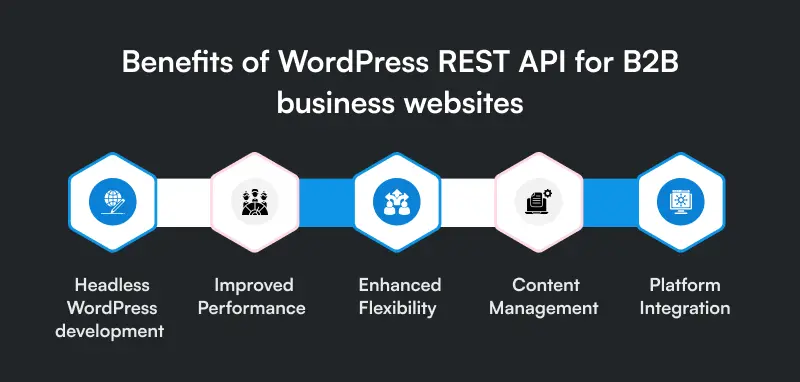
Headless WordPress development
The REST API enables developers to utilize WordPress as a headless CMS. The apps developed with React, Vue.js, or Angular by separating the front and back end. You can consult WordPress website development services for more assistance.
Improved Performance
Sites become more scalable by reducing server load and improving response times. You can simply fetch the required data rather than generating entire HTML pages.
Enhanced Flexibility
WordPress is a flexible CMS option since developers can use its data in third-party apps, mobile apps, and other external services.
Content Management
Bulk actions, and data synchronization between platforms and sites in WordPress speed optimization. And content updates can all be automated with the help of the API.
Platform Integration
Utilize REST API endpoints to easily integrate WordPress with cloud services. And even with eCommerce platforms and CRM solutions.
How does the WordPress REST API work?
The request-response model used by the WordPress REST API plugin is straightforward. Standard HTTP methods are used to make requests:
- GET: Get data (such as users, comments, and posts).
- POST: Generate new information (e.g., upload media, add a new post).
- PUT/PATCH: Update current information (e.g., edit a post)
- DELETE: Delete information (such as a post or comment).
Example API Request
You can use curl -X GET “https://example.com/wp-json/wp/v2/posts” to retrieve every post from a WordPress website.
This yields JSON data with all of the site’s published posts.
Example JSON Response
[
{
“id” : one, “date” : “2024-03-31T10:00:00” , “title” : { “rendered” : “Hello World” }, “content” : { “rendered” : “This is a sample post.” }, “author”: one, “link”: “https://example.com/hello-world”
}
]
The post ID, date, title, content, author ID, and permalink are all included in this response.
WordPress REST API authentication methods
Authentication is necessary to execute writing operations (POST, PUT, DELETE). So, WordPress offers several authentication options:

Cookie authentication
Ideal for admin panel interactions and users who are logged in. And it operates only in the same domain.
Application passwords
Application passwords, which were first introduced in WordPress 5.6, enable safe authentication for external apps without disclosing user credentials.
OAuth authentication
For third-party APIs that need a token exchange and authentication flow, OAuth 2.0 is advised.
JWT authentication
Token-based authentication for RESTful interactions is made possible by JWT. It is a popular and safe technique for authenticating API requests.
Example of JWT authentication in a request: curl -X GET “https://example.com/wp-json/wp/v2/posts” -H “Authorization: Bearer YOUR_JWT_TOKEN”
Real-world use cases of WordPress REST API
Creating headless webpages is one of the most used uses of the WordPress REST API. WordPress serves as the backend CMS in a headless arrangement. While content is dynamically rendered using a different frontend framework like React or Vue. With flexibility, developers can design user experiences that are both interactive and optimized.
The creation of mobile apps is another typical use case. Developers can create native or hybrid mobile apps. So, that it can smoothly retrieve and present WordPress content by utilizing the REST API. As WordPress for eCommerce software can collect data from a WooCommerce-powered store. While a news application can pull stories from a WordPress blog. So, it can help your B2B business too.
Future of WordPress REST API across the verticals
The WordPress REST API was improved to increase its usability and functionality. The future upgrades to concentrate on improving developer documentation. So, to increase authentication choices and enhance performance.
The REST API integrations will increase to use API-driven architectures and headless WordPress. Developers who become proficient with the API will be in a good position. As, to create cutting-edge apps and support the constantly growing WordPress community.
Conclusion:
For developers to expand WordPress beyond its conventional capabilities. Understanding the REST API opens up countless options to automate workflows. You can use WordPress REST API to build strong, scalable, and contemporary apps. Or you can consult WordPress development services for more assistance.
FAQs
What is the WordPress REST API used for?
An interface called WordPress Rest API gives access to other apps to the information and facilities of the WordPress Content Management System. Without logging in to WordPress, developers can use this device to include WordPress in websites and third-party web applications.
What is the REST API’s primary feature?
Because Rest API uses http standard, which supports a variety of formats such as HTML, XML and JSON, they are quick and light. Due to this capacity, it is perfect for IOT devices, mobile app projects and more.
What is WordPress’s REST API capability?
WordPress redefines the method of working of developers with websites and third-party apps, serving as a drain, WordPress rest API site data. Its comfortable architecture allows for smooth communication through the use of traditional http methods, which create new opportunities to manipulate dynamic materials.
Is the REST API for WordPress good?
One of the main advantages of integrating the REST API into your plugins is that it can take the place of your admin-ajax queries, saving you code and improving the security of your requests. Let’s look at a simplified example to see this in action. The plugin that adds a menu page to the WordPress dashboard is shown in this sample code.
Is a REST API expensive?
Only pay for the data that is transferred out and the API requests that you receive. Private APIs don’t charge for data transfers.


